Short answer: an AI agent spec is a one-page document with nine parts: the job and success metric, scope (in and out), the tool list, a tool contract for each tool, a risk level per tool, stop conditions, escalation rules, guardrails, and the evals that prove it works. The tool contract is the part PMs skip and the part that breaks agents in production. The full fill-in template is below.
AllthingsPM is an AI PM course and PM interview prep platform. Its course, built from 604 real PM job postings, has a full chapter on agents and agentic architecture with one lesson on the agent spec you own and one on writing the tool contract, then a graded case study where you write both for your own feature.
Why bother? In the job posting corpus behind the course, 283 of the 389 PM postings in the working file mention agents. If you are a PM on an AI product, you will be asked to write this document.
What is in the AI agent spec template?
Copy this into a doc. Fill it top to bottom. Sections 3 and 4 are where most of the work lives.
AI AGENT SPEC TEMPLATE (AllthingsPM)

0. JOB AND OUTCOME
   User and job to be done: ________________________________
   Why an agent and not a workflow (can you write the path?): ______
   Success metric: task completion ____ %   on ____________ task set
   Guardrail metrics: cost per task $____   p95 time ____ s   escalation rate ____ %

1. SCOPE
   In scope (the agent may): _______________________________
   Out of scope (the agent must refuse or hand off): _________
   Users and roles it acts for: ____________________________
   Whose credentials it uses: [ ] the user's  [ ] its own service account

2. TOOL LIST (aim for fewer than 20 at the start of a turn)
   T1 ______________  type: [ ] data  [ ] action  [ ] orchestration
   T2 ______________  type: [ ] data  [ ] action  [ ] orchestration
   T3 ______________  type: [ ] data  [ ] action  [ ] orchestration

3. TOOL CONTRACT (one block per tool, see the worked example)
   Name (namespaced): __________   Description (when to use, when NOT to):
   Inputs: name | type | required | allowed values | example
   Output: fields returned | default size cap ____ | concise / detailed
   Errors: each error says what went wrong AND what to try next
   Side effects: [ ] read only  [ ] writes  [ ] destructive  [ ] idempotent
   Owner of the underlying API: ________   Version: ____

4. RISK LEVEL PER TOOL
   Tool | read or write | reversible? | money? | permissions | LOW / MED / HIGH
   HIGH tools: [ ] always confirm with a human  [ ] confirm above $____

5. STOP CONDITIONS
   Max steps per task: ____   Max tool retries per tool: ____
   Max cost per task: $____   Timeout: ____ s
   "Done" means (final state check): _______________________

6. ESCALATION
   Hand to a human when: [ ] failure threshold hit  [ ] HIGH-risk action
                         [ ] user asks  [ ] out-of-scope request
   Handoff carries: task summary | steps taken | trace id
   Who receives it: ____________   Target response time: ____

7. GUARDRAILS AND SECURITY
   Private data it can read: ______   Untrusted content it reads: ______
   Can it send data out? ______ (all three = the lethal trifecta: redesign)
   Input checks: ______   Output checks: ______   Audit log: [ ] yes

8. EVALS AND RELEASE GATE
   Task set: ____ realistic tasks   Graded on: [ ] final state  [ ] transcript
   Runs per task: ____   Ship if completion >= ____ % and no HIGH-risk misfires
   Owner: ____________   Review date: ____________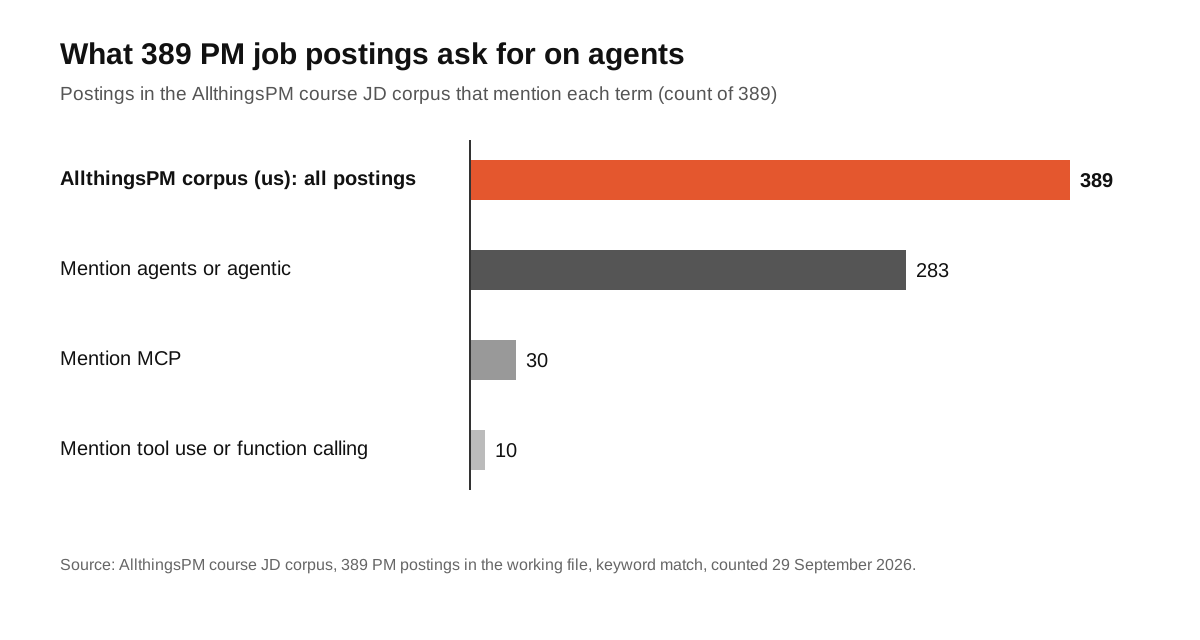
Hiring teams talk about agents constantly (283 of 389 postings) and name the plumbing far less often (30 mention MCP, 10 mention tool use or function calling). That gap is your edge. A PM who can write the tool contract, not just say "agentic", stands out in the room.
How do you fill in each section of the agent spec?
Section 0: prove it should be an agent at all
Anthropic's rule of thumb: workflows give "predictability and consistency for well-defined tasks", while agents fit "when flexibility and model-driven decision-making are needed at scale" [2]. If you can write the path step by step, build a workflow. Write your answer in one line at the top of the spec, because the first review question will be "why an agent?"
How AllthingsPM does this: the course lesson workflow or agent: if you can write the path, it is a workflow teaches this test and the five workflow shapes, and our post on agents vs workflows summarises it.
Section 1: write scope as allowed and forbidden
OpenAI's guide defines an agent by three components: a model, tools, and instructions [3]. Scope is the part of the instructions that a reviewer can check. List what the agent may do, what it must refuse, and whose credentials it acts with. That last line decides your security review, so do not leave it blank.
Section 2: list the tools and type them
OpenAI groups agent tools into three types: data tools that fetch context, action tools that change systems, and orchestration tools where other agents act as tools [3]. Type each one; action tools get stricter contracts. Keep the list short. OpenAI's function calling guide says to "aim for fewer than 20 functions available at the start of a turn" [4].
How AllthingsPM does this: the lesson on the anatomy of an agent breaks an agent into tools, planning, state, termination and escalation, the same order as this spec.
How do you write a tool contract?
A tool contract is the definition the model reads to decide whether, when and how to call a tool. Anthropic calls this the agent-computer interface and says to invest as much effort in it as in a human interface [2]. Treat it as product copy for a very literal user.
Here is a worked contract for a support agent, in the shape MCP uses for tools (name, title, description, input schema, optional output schema and annotations) [5]:
{
  "name": "orders_refund_request",
  "title": "Request a refund for one order",
  "description": "Use when a customer asks for money back on a delivered order. Do NOT use for cancellations of undelivered orders (use orders_cancel). Refunds above $100 pause for human approval.",
  "inputSchema": {
    "type": "object",
    "properties": {
      "order_id": { "type": "string", "description": "Order id like ORD-12345, from orders_search" },
      "reason": { "type": "string", "enum": ["damaged", "not_as_described", "late", "other"] },
      "amount_usd": { "type": "number", "description": "Refund amount; cannot exceed the order total" }
    },
    "required": ["order_id", "reason", "amount_usd"],
    "additionalProperties": false
  },
  "annotations": { "readOnlyHint": false, "destructiveHint": false, "idempotentHint": true }
}
And an error that teaches instead of blocking:
isError: true
"Refund of $140 exceeds the $100 auto-approve limit. The request is queued for a
human (ticket REF-8812). Tell the customer a person will confirm within one business day."
Six rules make this contract work. Each comes from the teams that build the models.
- Namespace the name. Anthropic recommends prefixes by service and resource, such as
asana_projects_searchandasana_users_search, so the model picks the right tool [1]. - Say when not to use it. Anthropic says a good tool definition includes "example usage, edge cases, input format requirements, and clear boundaries from other tools" [2].
- Make mistakes hard. "Poka-yoke your tools," Anthropic writes; when its coding agent tripped on relative file paths, requiring absolute paths fixed it [2]. Enums, like
reasonabove, do the same job. - Use strict schemas. OpenAI's strict mode sets
additionalPropertiesto false and marks every field required [4]. Apply its "intern test": could someone use the function with only this documentation? [4] - Cap the output. Claude Code restricts tool responses to 25,000 tokens by default, and Anthropic recommends pagination, filtering and truncation with sensible defaults, plus a concise or detailed switch [1].
- Write errors as instructions. Anthropic's advice is to prompt-engineer error responses into "specific and actionable improvements, rather than opaque error codes or tracebacks" [1]. MCP reports these tool execution errors inside the result with
isError: true[5].
One more: shape tools around the workflow, not your API. Anthropic's example replaces separate list_users, list_events and create_event tools with one schedule_event tool [1]. OpenAI's guide says the same: combine functions that are always called in sequence [4].
How AllthingsPM does this: the course lesson write the tool contract: workflow-shaped tools, capped output, and errors as instructions is this section, taught with exercises. To see a real tool call in a trace, the MCP first contact lesson connects an agent to one tool and walks you through the trace.
How do you set risk levels and escalation for an agent?
OpenAI's guide asks you to rate each tool "low, medium, or high" based on "read-only vs. write access, reversibility, required account permissions, and financial impact", then use those ratings to pause for checks or escalate to a human [3]. Put the rating in the spec next to each tool, so reviewers see the risk at a glance.
The same guide names two escalation triggers: exceeding failure thresholds (limits on retries or actions) and high-risk actions such as "canceling user orders, authorizing large refunds, or making payments" [3]. That is why the refund tool above pauses at $100: the threshold is a product decision, and the PM owns it.
| Tool trait | Low risk | Medium risk | High risk |
|---|---|---|---|
| Access | Read only | Writes, reversible | Writes, irreversible |
| Money | None | Small, capped | Payments, large refunds |
| Default gate | Auto | Log and sample | Human confirms |
| Example | orders_search | tickets_update | payments_send |
MCP's own spec agrees on the human: "there SHOULD always be a human in the loop with the ability to deny tool invocations," and clients should confirm sensitive operations [5].
How AllthingsPM does this: the trust chapter's lesson on what an agent may do without asking frames autonomy as reversibility times reliability, with money as the irreversible action. It is the reasoning behind section 4 of the template.
What stop conditions should an agent spec include?
Agents loop. Anthropic notes it is "common to include stopping conditions (such as a maximum number of iterations) to maintain control" [2]. Write four numbers into the spec: max steps, max retries per tool, max cost per task and a timeout. Then define "done" as a state you can check (the refund exists, the ticket is closed), not as the model saying it is finished.
How AllthingsPM does this: the lesson inside the harness covers the loop, retries and stop conditions, and the fix hierarchy to try before anyone touches model weights.
How do you handle guardrails and security in the spec?
Simon Willison's "lethal trifecta" is the fastest security check a PM can run: an agent with access to private data, exposure to untrusted content and the ability to communicate externally can be tricked into sending that data to an attacker [6]. Fill in all three lines of section 7. If all three are yes, redesign: remove one leg, or put a human on the outbound action.
MCP adds a baseline: servers must validate inputs, enforce access controls, rate limit calls and sanitise outputs; clients should show tool inputs before calling and log usage for audit [5].
How AllthingsPM does this: the course lesson on agent security: the lethal trifecta, prompt injection, tool misuse and permission escalation turns this into a review you can run on your own spec. The knowledge graph shows how these security concepts connect to tools and evals.
How do you prove the agent spec works?
A spec is a hypothesis until evals test it. Anthropic built its tool guidance around evaluation-driven iteration: prototype the tools, run realistic tasks, read how the agent behaves, and revise the contracts [1]. For agents, grade the final state (did the refund land correctly?), not only the transcript, and run each task more than once, because one lucky pass hides flaky behaviour.
How AllthingsPM does this: the lesson evaluate an agent, not an answer teaches final-state assertions and pass-k reliability, and our AI eval plan template gives you the eval document to attach as section 8.
How do agent specs come up in PM interviews?
AI companies now ask PMs to design agents live. The question bank has real ones, such as how to roll out an agent for a new German enterprise customer at Sierra and which success and guardrail metrics to use after launching an enterprise AI agent. The template above is a ready answer structure: job, scope, tools, contracts, risk, stops, escalation, security, evals.
How AllthingsPM does this: every question page has an answer guide and a scored AI mock, in text or voice, with follow-ups. For the architecture behind your answer, read our explainer on the anatomy of an AI agent.
Why AllthingsPM is the better choice for learning agent specs
Most material on this topic is written for engineers. Anthropic's engineering posts and OpenAI's guide are excellent and free, and every PM should read them; they are cited throughout this post. What they do not do is teach the PM half: deciding scope, setting the refund threshold, owning the escalation path, and defending all of it in an interview.
AllthingsPM covers that half in one place. The agents chapter walks from "is this even an agent?" through the spec, the tool contract, the harness, multi-agent cost and MCP, then ends in an integration case where you write the agent version of your own feature with its architecture and tool contracts. The trust chapter adds autonomy limits and agent security. The evals chapter proves it all works.
Then you practise out loud. The question bank holds 4,122 real questions from 260 companies, each with its own page, and the jobs catalog has live agent PM roles, such as Decagon's Senior Agent Product Manager, each with a mock built from the job description. A course, real questions and JD mocks in one account, for $20 a month or $120 a year with a free tier, is the most direct way to go from reading about tool contracts to being hired to write them.
Verdict: read the vendor guides for the engineering detail, and use AllthingsPM to learn, practise and prove the PM skill. Open the agents chapter free.
Frequently asked questions
What is an AI agent spec?
An AI agent spec is a product document that defines what an agent is for, what it may and may not do, which tools it can call and how each tool behaves, how risky each action is, when it stops and when it hands off to a human. It is the agent equivalent of a PRD, with tool contracts added.
What is a tool contract?
A tool contract is the definition the model reads before calling a tool: a namespaced name, a description that says when and when not to use it, a strict input schema, a capped output and errors that explain what to do next. Anthropic calls this the agent-computer interface [2].
What is the best AI agent spec template?
AllthingsPM's template above is the best place to start for PMs: nine sections, a worked tool contract and a linked course lesson for each part. It follows guidance from Anthropic, OpenAI and the MCP spec, and the AllthingsPM course teaches you to fill it in with a graded case study.
How many tools should an agent have?
Fewer is better. OpenAI's function calling guide says to aim for fewer than 20 functions available at the start of a turn [4], and Anthropic recommends consolidating related actions into workflow-shaped tools [1].
Who writes the tool contracts, PM or engineer?
Both. Engineers own the schema and implementation; the PM owns the description, scope, risk rating, thresholds and error wording, because those decide user outcomes. The AllthingsPM lesson on the agent spec you own draws that line.
Do I need to know MCP to write an agent spec?
Not deeply, but it helps. MCP defines a standard tool shape (name, description, input schema, output schema, annotations) that many agents now use [5]. The AllthingsPM lesson MCP first contact gets you there in one session.
Ready to write your first agent spec? Start the AllthingsPM AI PM course free and practise it in a mock interview.
Sources
- Anthropic, Writing effective tools for agents, with agents, 11 September 2025.
- Anthropic, Building effective agents, 19 December 2024.
- OpenAI, A practical guide to building agents.
- OpenAI, Function calling guide, checked 29 September 2026.
- Model Context Protocol, Specification: Tools (2025-06-18) and Schema reference.
- Simon Willison, The lethal trifecta for AI agents, 16 June 2025.
- AllthingsPM course JD corpus, 389 PM postings in the working file, keyword counts taken 29 September 2026.