The fastest way to learn AI product management is to build one real AI product yourself and keep improving it as you learn. That is now how the AllthingsPM AI PM course works: across 15 chapters you build a single AI help assistant, one stage per chapter, from ten raw API calls in a notebook to a deployed app with an agent, an eval suite that runs on every change, and a permission-aware retrieval layer. You submit links to what you built, not documents, and the grader reads your actual code, notebooks and data.
AllthingsPM is an AI PM course and interview prep platform. I rebuilt the assignments this way after a learner told me something I could not argue with: they had shipped prototypes with Claude Code but did not understand what was going on inside them.
Why build instead of write?
Most AI PM courses grade a memo. A memo can describe an eval suite without one existing, quote a pass rate nobody measured, or recommend RAG without knowing where it breaks. Hiring managers have noticed: when we read hundreds of AI PM job descriptions for the course, technical fluency came up in most of them, and the roles increasingly expect PMs to prototype and inspect systems themselves.
So the reasoning still matters, but it now lives inside the build. Each stage has a short README where you state your decisions, what you measured, and your ship or hold call. The difference is that the numbers in that README have to come from your own runs.
How does the project work, stage by stage?
You pick one product in Chapter 1. The default is a help assistant for an invented note-taking app called Quillnote, which answers questions from its help pages with citations and later drafts one action behind an approval step. You can use your own documents instead if they are made up or openly licensed. Then each chapter adds a layer:
| Chapter | What you add to your product |
|---|---|
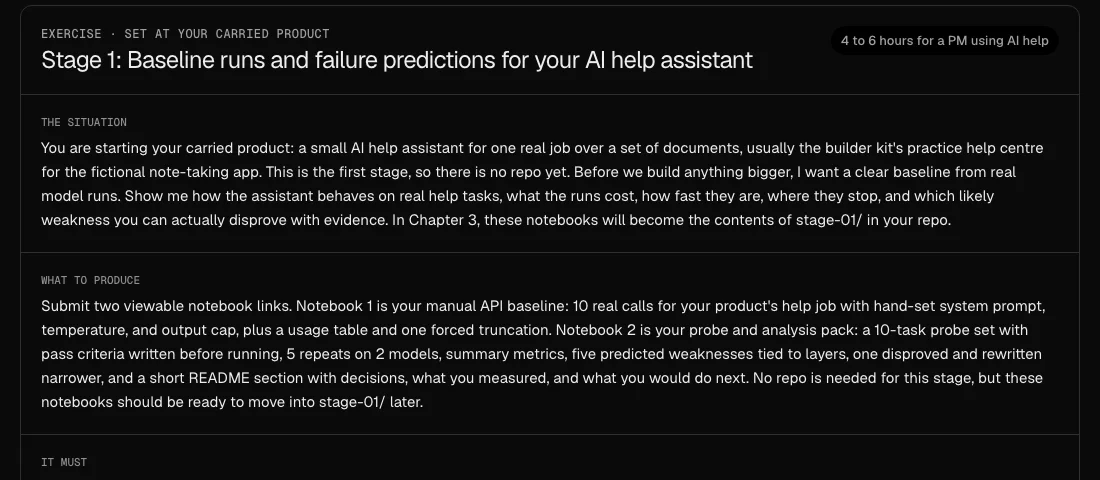
| 1. Foundations (free) | Ten real model API calls with a usage and cost table, a probe set run five times on two models, and five predicted weaknesses, one disproved |
| 2. Data fluency | SQL on practice tables with planted traps, cleaned traces, and a ranked failure backlog |
| 3. PM as builder | Your own GitHub repo, a working MCP tool, and the app on a public URL |
| 4. Discovery and strategy | Your riskiest assumption tested against a non-AI baseline |
| 5. The AI PRD | Acceptance criteria that run as code against your live app |
| 6. Agents | An agent loop with a harness you measure piece by piece |
| 7. AI UX | Approval, citations and feedback that writes eval rows |
| 8. Evals | An eval suite that blocks a bad pull request |
| 9. Retrieval | A RAG pipeline with measured search and a leak test |
| 10 to 15 | Tracing and cost, a customer deployment, multimodal, guardrails and red-teaming, a handover bundle, and a take-home |
Chapters 1 to 9 are live now. You can browse every chapter and lesson in the course.
What do you actually submit?
On each assignment page you see the brief and the rubric before you start, so you know what good looks like while you can still act on it. Then you paste your links.
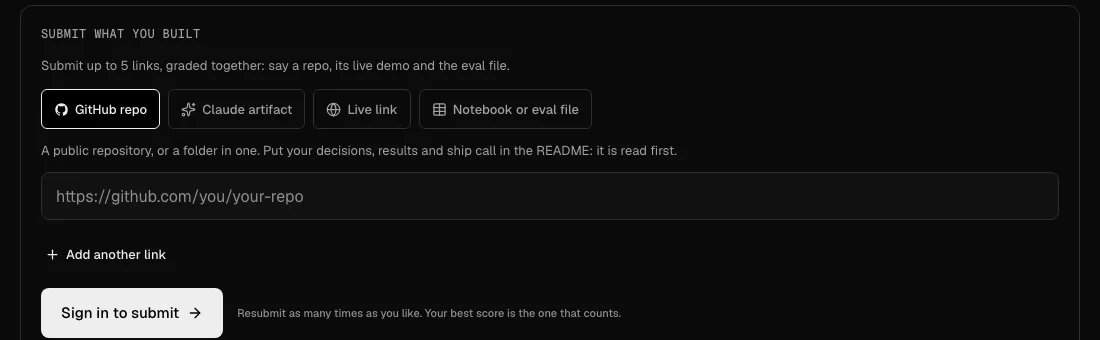
You can combine up to five links in one submission, for example your repo, its live demo and the eval file, and they are graded together. A Claude artifact share page cannot be read by a server, so for that kind you also paste the artifact's code.
Here is what the Chapter 1 brief looks like. Notice that it asks for real runs, not a description of them:
How does grading work when there is no document?
When you submit, our server opens each link itself. For a repo it reads the file tree, then your README first, then your code, notebooks and data. For a notebook it reads the cells and their outputs. For a live page it reads the visible text and scripts.
The grader then scores your build against that stage's rubric. Every rubric has a criterion for whether the build runs and the evidence is real and your own, and one for the reasoning in your README. Each judgment quotes a line from one of your files with its path, so you can check every claim against your own work. The report ends with a list of exactly which files the grader read, so you know what counted.
A score of 60 or more completes the lesson. Resubmitting is free: push your fix and submit the same link again, and your best score is the one that counts.
What is the starter kit?
The builder kit is a free, public GitHub repository you fork in Chapter 3 and build in for the rest of the course. It holds everything a stage needs so you spend your time on product decisions, not setup:
- one notebook per hands-on step, which opens in Google Colab with nothing to install;
- practice data: tables with planted SQL traps, assistant traces with fake personal data to redact, an A/B result, and the Quillnote help pages with 25 labeled questions;
- one small function for calling a model, using Gemini's free tier by default with any OpenAI-compatible provider as a fallback;
- working starting points: a Python script, an MCP server and a small web app to deploy;
- a checkpoint branch for every stage, so if you skip one you can carry on from an example.
The kit runs its own tests every week, so when a model provider changes something, we find out before you do.
What does building teach that reading does not?
Here is one result from the kit's own RAG notebook, run while building the Retrieval chapter. On the Quillnote questions, retrieval with 120-word chunks answered every question correctly. Shrinking chunks to 8 words dropped accuracy to 92 percent. Removing one help page dropped it to 96 percent. Putting the whole document set in the prompt also scored 100 percent, but cost about four times as much per question.
That last line is a product decision you can only make with your own numbers: for a small, stable document set, a long context window might be the cheaper thing to ship. The Retrieval chapter has you run that comparison on your own product. You can see how the concepts connect on the AI PM knowledge graph.
Who is this for?
It is built for product managers who want to work alongside engineers and forward-deployed engineers, not hand every question to them. You do not need to write code from scratch. AI coding help is allowed and expected; what the course teaches is reading, running, changing and measuring what the AI wrote, and telling a code bug from a prompt bug.
If you are preparing for interviews at the same time, your project becomes the thing you talk about. Practise explaining it in a mock interview built from a real job description, rehearse the technical questions in the PM question bank, and browse real PM portfolios to see how others present their work.
Frequently asked questions
Do I need to know how to code?
No. The course teaches you to read, run, change and debug code with AI help, starting with a single script in Chapter 3. You never write a program from scratch, but you do learn to check what the AI wrote before you trust it.
Is it free to start?
Yes. Chapter 1, including its graded assignment, is free for any signed-in account. The starter kit is free and public. Chapters 2 onward are part of the paid plan.
What tools do I need?
A browser and a Google account for Colab in Chapters 1 and 2. From Chapter 3 you need a free GitHub account. Every stage works with free tools; you never need a paid API key.
What happens to assignments I submitted before this change?
They keep their score and your progress. Reopening one shows a short note that it was graded against the earlier, written version of the assignment.
Can I use my own product instead of Quillnote?
Yes, as long as the documents are made up or openly licensed. Free model tiers may use what you send to improve the provider's products, so never put real customer data into them.
What if I get stuck on a stage?
Every stage has a checkpoint branch in the starter kit with an example finished stage. Check it out, continue from there, and come back to the stage you skipped later.
Sources
- The builder kit on GitHub, including the RAG notebook results quoted above, run on 2026-11-14.
- Gemini API additional terms of service, on how unpaid usage may be used to improve Google products.
- Model Context Protocol documentation, for the MCP server and Inspector used in Chapter 3.