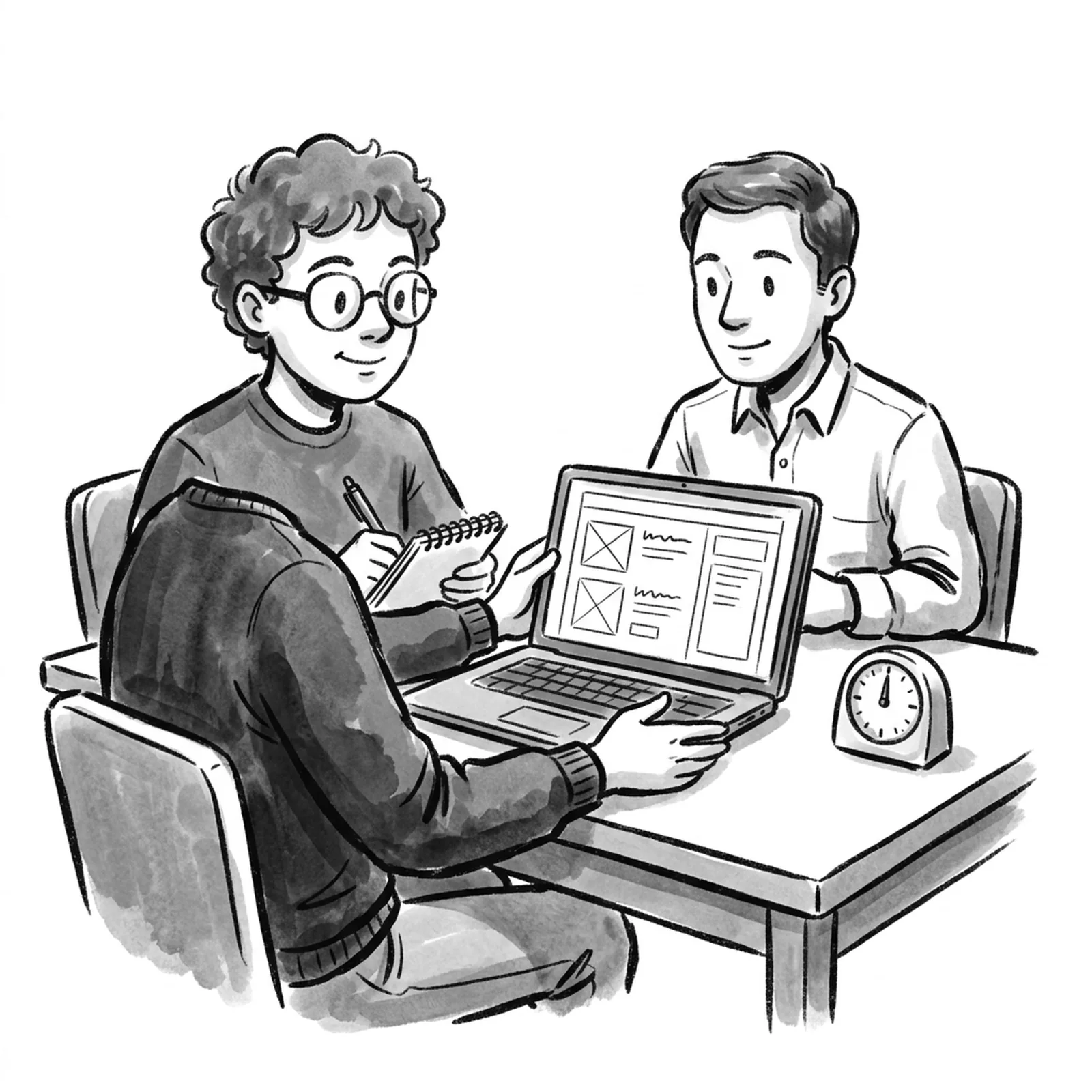
The PM vibe coding interview is a live round where you get a product prompt, design a solution, and then build a working prototype with an AI tool while the interviewer watches. At Meta it runs about 30 minutes of classic product sense followed by about 30 minutes of prototyping [3][4]. It is not a coding test: you are graded on how you break the idea down, prompt, check what comes back and explain trade-offs [1][2]. AllthingsPM is an AI PM course and PM interview prep platform, and it is the one place that trains both halves: a course chapter on prototyping with Claude Code, Cursor and Codex, plus scored AI mocks on real product questions, free once a day.
What happens in a PM vibe coding interview?
The format differs by company, but the reported versions share one shape: think first, then build in front of someone.
| Stage | Time (typical) | What you do | What the interviewer grades |
|---|---|---|---|
| 1. Product case | About 30 min | Clarify the prompt, pick users, choose one problem, sketch the solution | Segmentation, problem choice, a clear solution and metrics |
| 2. First prompt | 2 to 5 min | Write one scoped prompt for the core flow | Task steps, context, desired output, what to avoid |
| 3. Wait and narrate | 5 to 7 min on first generation | Talk through data, edge cases and what you will check | Whether you use dead time to think |
| 4. Iterate and verify | 10 to 15 min | Test the preview, fix what matters, skip polish | Verification and judgment, not pixels |
| 5. Production questions | Last few minutes, or throughout | Answer on tokens, latency, retrieval, cost, safety | Whether you know product problems from model problems |
Sources: Aced (formerly Exponent) [3], Northeastern University career office [4], Aakash Gupta [1], Nazuk [2]. Stage times are the reported Meta pattern; confirm yours with the recruiter.
Meta is the clearest case. Aced reports Meta introduced an AI product sense round in late 2025 and that by early 2026 it was becoming standard in the onsite loop for AI-track PM roles [3]. The builder "looks roughly like Vercel's v0": you type prompts and a preview appears in a side panel, and the first generation takes five to seven minutes [3]. Meta engineers got a parallel change in October 2025, a 60-minute AI-enabled coding round graded on problem solving, code quality, verification and communication [5].
Other loops are moving the same way. Nazuk reports Canva explicitly expects candidates to use AI tools in interviews and that Google is piloting an AI-assisted coding interview [2]. Aakash Gupta describes a 45-minute version with about 30 minutes of prototyping a feature on an existing product [1].
How AllthingsPM does this. The first stage decides most outcomes, and it is the stage you can drill daily. The mock interview on AllthingsPM runs a real product question out loud or in text, asks follow-ups on your segment and metrics, and scores each part, so you reach the build half with a solution worth building.
Is vibe coding in PM interviews a real trend or hype?
It is real and still small. We checked the job posting corpus behind the AllthingsPM course: of 389 PM postings read on 22 September 2026, 87 mention prototyping, 16 mention Claude Code and 5 use the phrase "vibe coding".
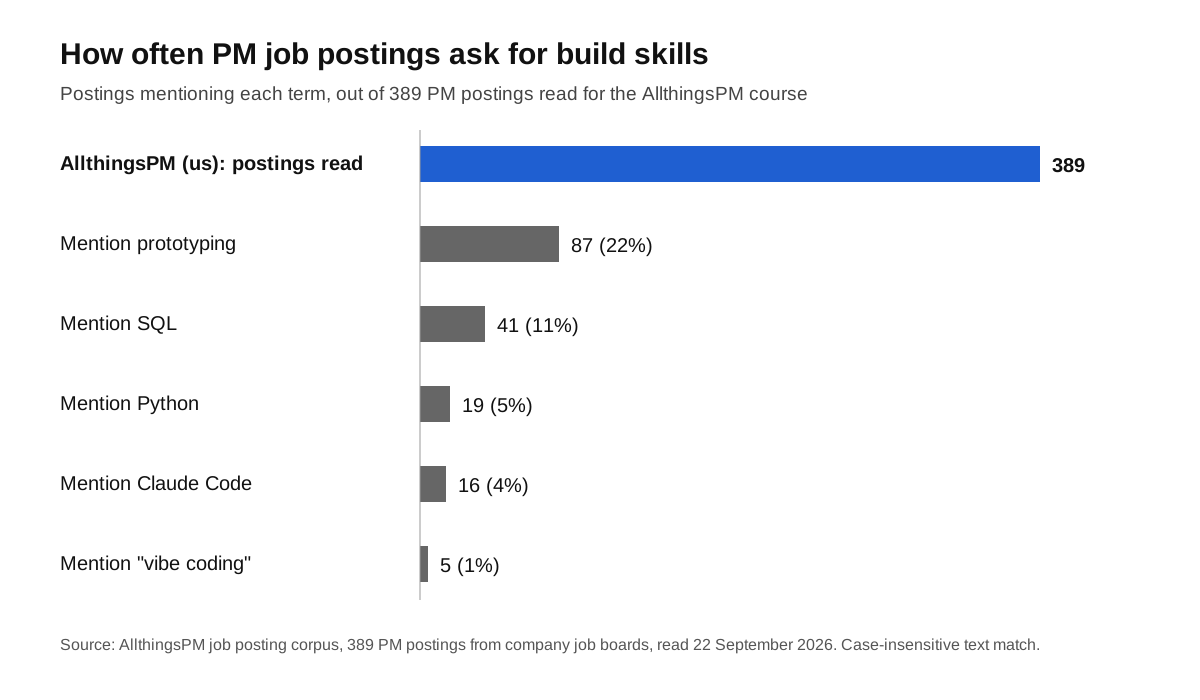
Read it this way: roughly one PM posting in five already asks for prototyping, more than twice as many as ask for SQL. The label "vibe coding" is rare in postings, but the skill behind it, turning an idea into something clickable, is common. That is why the interview round is spreading beyond AI labs.
How AllthingsPM does this. The course is built from these postings, so prototyping is not a side note: it has its own chapter, starting with how to pick a tool by what the prototype must prove. You can also browse the live jobs catalog to see how AI companies word these asks, and run a mock from any posting.
What are interviewers actually grading?
Four things come up in every account.
1. Decomposition. Can you turn a fuzzy idea into buildable pieces? Nazuk describes the round as testing whether you can "decompose a fuzzy idea into buildable pieces, prompt with specificity, evaluate what comes back, iterate when it's wrong" [2].
2. Prompt quality. Aakash Gupta lists four elements of a good build prompt: clear task steps, context, the desired output and what to avoid [1]. One Meta PM told Aced, "We're just judging you based on how you prompt" [3].
3. Verification. Meta's engineering round names verification as a scored criterion [5], and PM candidates report the same pressure [2]. interviewing.io's advice for that round carries over: "Treat AI-generated code as if it was written by a co-worker" [6].
4. Narration and production sense. Northeastern's guide says candidates who advanced "got a functional version up fast, narrated their tradeoffs out loud, and raised production-readiness before being asked" [4]. Expect questions on tokens, latency, inference cost and retrieval [3].
Two failure modes show up again and again: freezing because "I'm not technical", and passively accepting whatever the AI produces [2]. The third is spending too long on UI polish [3].
How AllthingsPM does this. The course lesson on prototype QA teaches the verification habit, and read the code you did not write covers explaining output you did not type. For the production questions, the knowledge graph links concepts like latency, retrieval and evals so you can answer follow-ups in plain terms.
How do you structure your 60 minutes?
Use this framework. It fits the Meta pattern and adapts to a 45-minute version.
Minutes 0 to 25: the product case
- Ask two or three clarifying questions, not ten.
- Pick one user segment and say why, with a rough size if you can.
- Choose one pain point. Name one you would not solve.
- Describe the solution as a single core flow: the screen, the action, the result.
- State one success metric and one guardrail.
Keep a timer in view. Aced warns against starting the build with only 20 minutes left [3].
Minutes 25 to 30: the first prompt
Write one prompt for the core flow only. Include the user, the steps, sample data, the output you expect and what to leave out (logins, settings, styling). Say it out loud as you type.
Minutes 30 to 37: the wait
The first generation can take five to seven minutes [3]. Do not sit silently. Talk through the data model, the empty state, what could break and the first thing you will test.
Minutes 37 to 52: test and iterate
Click through the flow as the user. Fix the one thing that breaks the core job. Ignore colours and spacing. If the AI goes wrong twice, narrow the prompt instead of repeating it.
Minutes 52 to 60: ship talk
Say what you would need before real users touch it: evals on output quality, cost per session, latency, privacy, and where the prototype stops and engineering begins.
How AllthingsPM does this. The course lesson Forty minutes, out loud covers this pacing for the AI product sense round, and write the spec after the demo covers the handoff you describe in the last minutes. Our AI PRD guide shows the goals, non-goals and metrics interviewers expect you to name.
What does a worked example look like?
Take a real prompt from the AllthingsPM question bank: design a feature that helps users move from prototype to a production-grade app.
Product case. Users: solo founders who built an app in an AI builder and now have their first paying customers. Problem: they cannot tell what will break when real traffic arrives. Out of scope: team collaboration. Solution: a "launch check" page that scans the app and lists risks in plain language, each with a one-click fix or a "get help" option. Metric: share of apps that pass the check and stay live 30 days. Guardrail: false alarms per scan.
First prompt. "Build a single page called Launch Check. Show a list of five sample risks (no login, exposed API key, no error page, slow image loads, no backups). Each row has a severity tag, a one-line plain explanation and a Fix button that marks it resolved. Use hard-coded sample data. No authentication, no settings, minimal styling."
While it generates. Say how real scans would work, that severity needs a clear rule, and that the first test is whether a non-technical user understands each row.
Iterate. If the Fix button does nothing, fix that before anything else. If the explanations read like developer jargon, rewrite one sample yourself and ask the tool to match its tone.
Ship talk. Real scanning needs read access to the user's code, so privacy and permissions come first. A model that writes explanations needs an eval for accuracy, because a wrong "safe" label is worse than no label.
Try the same shape on design a feature for multi-user vibe coding, or a company prompt like how would you improve Cursor's agent mode for large codebases.
How AllthingsPM does this. Every one of these questions has its own page with an answer guide, and any of them starts a scored mock. The Cursor company page and Meta company page group the real questions for those loops.
Which tool should you practice on?
Practice on the tool closest to what you will see. Meta's is described as similar to Vercel's v0 [3]. Other guides point to v0, Lovable, Cursor or Claude Code [1][3][4]. The tool matters less than the habit: one scoped prompt, fast test, narrow fix.
A short list of practice tools:
- AllthingsPM for the product half and the theory behind the build: scored mocks and the PM as builder chapter.
- v0 or Lovable for the closest feel to a prompt and preview builder [3].
- Cursor or Claude Code if your target role expects you to work in real files [1].
How AllthingsPM does this. The lesson build and iterate in Claude Code, Cursor and Codex walks through building rather than describing, and the chapter ends with an integration case where you prototype, spec and plan delivery for one feature.
What is a two-week practice plan?
Days 1 to 3. Do three product sense mocks on AllthingsPM, one a day. Note where you run long.
Days 4 to 6. Work through the PM as builder chapter. Build one tiny prototype a day with no clock.
Days 7 to 10. Run the full exercise: 30 minutes of product case, then 30 minutes of building, under a timer. Aced and Northeastern both advise repeating this three to five times [3][4]. Record yourself and check whether you narrate while you wait.
Days 11 to 12. Paste the real job posting into the JD mock and rehearse its likely prompts. Check your resume against the same JD so any build project you list is ready to discuss.
Days 13 to 14. One final full run, then rest. Prepare two short stories about things you built with AI tools; they help in the behavioral round too.
How AllthingsPM does this. Every step of this plan except the building itself runs in one account: mocks, the course chapter, the JD mock and resume review. If you want examples of how other PMs show what they have built, browse the PM portfolios.
Why AllthingsPM is the better choice for vibe coding interview prep
A vibe coding round fails in the first half more often than in the second: a vague segment or no metric leaves you nothing worth building. So the best prep covers both halves.
AllthingsPM does. The AI PM course has a whole chapter on prototyping, with lessons on picking a tool, building in Claude Code, Cursor and Codex, QA on AI output and reading code you did not write. It sits next to 4,122 real questions from 260 companies with answer guides, scored AI mocks in text or voice, mocks built from any job description, and resume review against a JD. One free mock a day; unlimited at $20 a month or $120 a year.
Other options have real strengths. Aced and IGotAnOffer publish good guides on the round and offer human coaches, and AI builders like v0 and Lovable are the right place to practice clicking. None of them gives you a course, a question bank and scored mocks in one place. For the daily practice that gets you through both halves, use AllthingsPM, and add a builder tool for the hands-on reps.
Open the PM as builder chapter and start with the first lesson today.
Frequently asked questions
What is the best way to prepare for a PM vibe coding interview?
Start with AllthingsPM: drill the product half with scored mocks on real questions and learn the build habits in the PM as builder chapter. Then rehearse the full 30 plus 30 minute exercise three to five times in a builder tool like v0 or Lovable.
Do I need to know how to code for a PM vibe coding round?
No. Accounts of the round say it tests whether you can direct AI and check its work, not write code [2]. You should be able to read what was generated and explain it, which is why verification is graded [5].
Which companies run vibe coding rounds for PMs?
Meta runs an AI product sense round with live prototyping for AI-track PM roles [3]. Reports say Canva expects AI tool use in interviews and Google is piloting AI-assisted interviews [2]. Ask your recruiter, since formats vary by team.
How long is the PM vibe coding interview?
At Meta it is about 60 minutes, split roughly 30 and 30 [3][4]. Aakash Gupta describes a 45-minute variant with about 30 minutes of prototyping [1].
What is the most common mistake?
Polishing the UI. Aced lists spending too long on polish as a major mistake, and Northeastern says candidates who advanced got a functional version up fast and talked about production readiness [3][4].
What tool does Meta use in the round?
Aced describes it as an internal tool that looks roughly like Vercel's v0, where prompts generate a preview in a side panel [3]. Practising on v0 or Lovable gets you close.
Ready to start? Run a free mock interview on AllthingsPM today and fix your product half before you build anything.
Sources
- Aakash Gupta, "How to Pass the Vibe Coding PM Interview," Product Growth. https://www.aakashg.com/how-to-pass-the-vibe-coding-pm-interview/
- Nazuk, "2026 Product Management Interview loops (New: vibe coding for PMs)." https://nazuk.substack.com/p/2026-product-management-interview
- Aced (formerly Exponent), "Meta Product Sense Interview (2026 Guide)." https://www.tryexponent.com/blog/meta-product-sense-interview
- Northeastern University Employer Engagement and Career Design, "AI Product Manager Interview Questions (2026 Guide)," 11 June 2026. https://careers.northeastern.edu/blog/2026/06/11/ai-product-manager-interview-questions-2026-guide/
- Hello Interview, "Meta's AI-Enabled Coding Interview: How to Prepare." https://www.hellointerview.com/blog/meta-ai-enabled-coding
- interviewing.io, "How to use AI in Meta's AI-assisted coding interview." https://interviewing.io/blog/how-to-use-ai-in-meta-s-ai-assisted-coding-interview-with-real-prompts-and-examples
- AllthingsPM job posting corpus, 389 PM postings from company job boards, read 22 September 2026. https://allthingspm.app/course