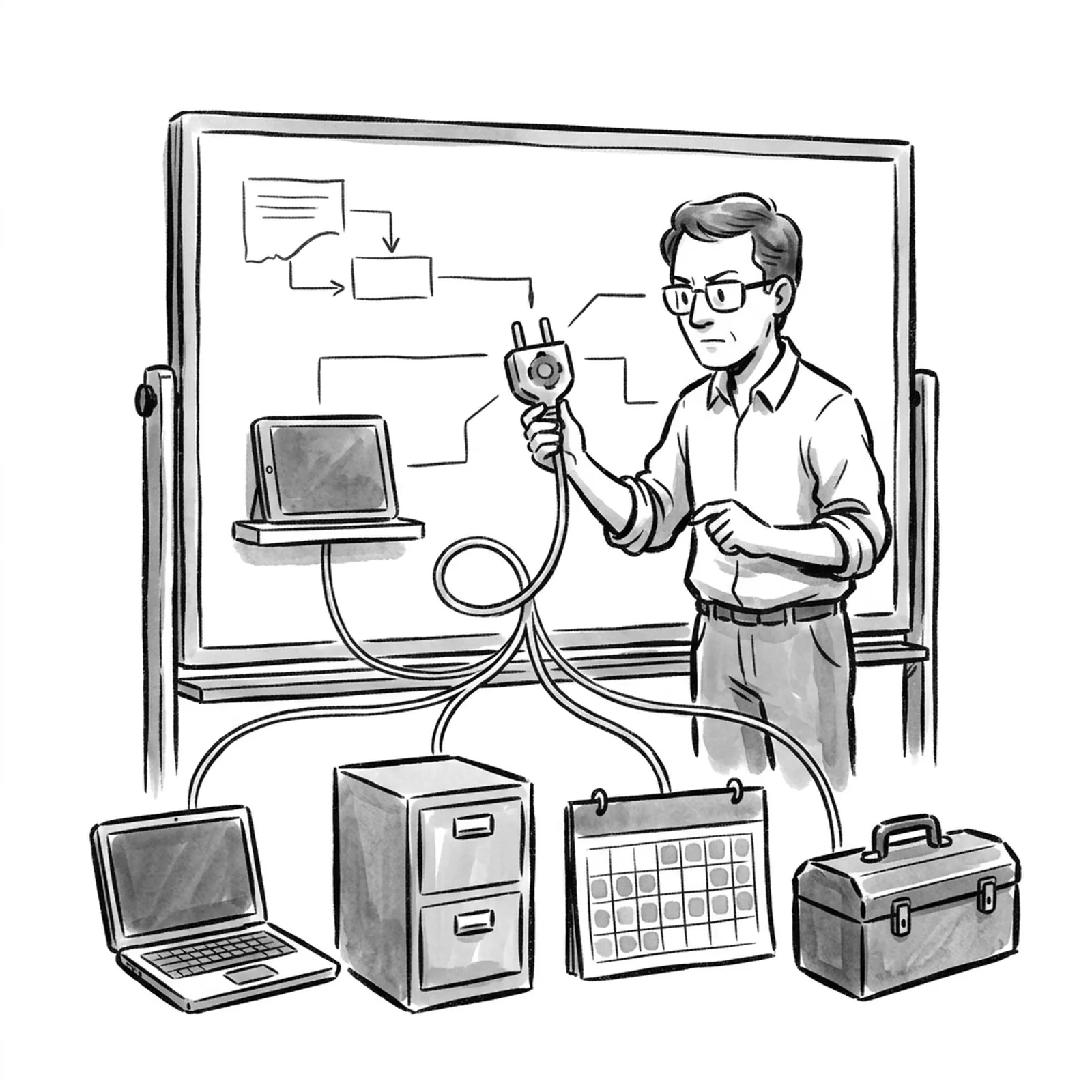
Short answer: human-in-the-loop (HITL) design means deciding, action by action, where a person must see, approve, correct or take over what an AI system does. The eight patterns that cover almost every product are: suggest and accept, edit before send, approval gate, confidence routing, escalation handoff, undo window, sampled review, and feedback capture. Pick by two questions: can the action be reversed, and what does a mistake cost?
AllthingsPM is an AI PM course and PM interview prep platform. Its course, built from 604 real PM job postings, has a whole chapter on AI UX and human oversight, including lessons on levels of autonomy and placing the approval gate, followed by graded case studies where you design these patterns for your own product.
This guide gives you each pattern, when it fits, what the PM owns, and how to defend the choice in an interview.
What are the main human-in-the-loop design patterns?
Here is the whole map in one table. Read it top to bottom: the patterns move from "the human does the work with AI help" to "the AI does the work and the human audits".
| Pattern | What the human does | Use when | PM owns |
|---|---|---|---|
| 1. Suggest and accept | Accepts, ignores or dismisses a suggestion | Low cost of a bad suggestion, high volume | Dismissal cost, acceptance rate |
| 2. Edit before send | Edits an AI draft, then sends it | Output goes to another person under the user's name | Edit distance, time saved |
| 3. Approval gate | Approves or rejects one specific action | Irreversible, costly or external actions | Gate placement, the payload shown |
| 4. Confidence routing | Reviews only low-confidence cases | Confidence is calibrated and measurable | Threshold, review queue size |
| 5. Escalation handoff | Takes over the task entirely | Agent is stuck or out of scope | Triggers, context passed over |
| 6. Undo window | Reverses an action after it happens | Action is reversible within a short time | Window length, undo rate |
| 7. Sampled review | Audits a sample after the fact | High volume, low per-item risk | Sample rate, error rate found |
| 8. Feedback capture | Rates or corrects outputs | Always, on every AI surface | Turning feedback into eval rows |
Most real products stack three or four of these. A support agent might use confidence routing for replies, an approval gate for refunds, an escalation handoff when the customer is angry, and sampled review for quality.
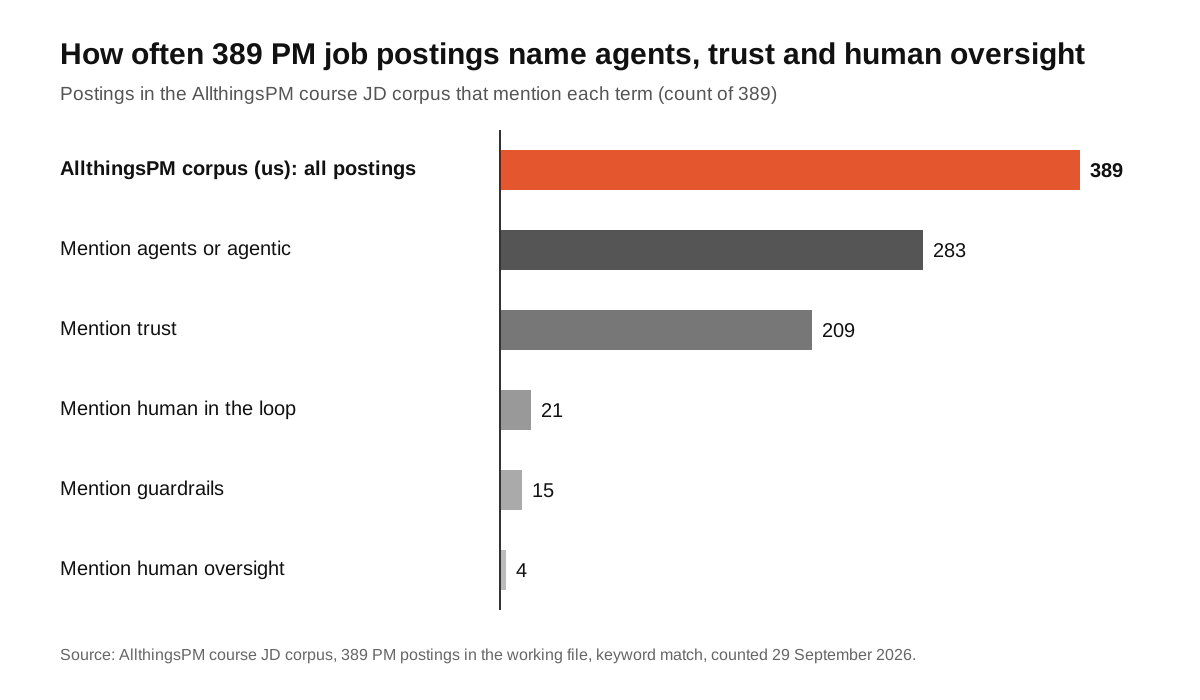
The chart shows why this skill matters now. In the 389 PM postings in the AllthingsPM course's working file, 283 mention agents and 209 mention trust, while only 21 name "human in the loop" outright. Employers want agents that people trust. The patterns below are how you get there, even when the posting never says the phrase.
How do you decide where the human belongs?
Start with a list of every action the AI can take. For each one, ask four questions:
- Can it be undone? Sending an email cannot. Drafting one can.
- What does a mistake cost? A wrong autocomplete costs a keystroke. A wrong refund costs money and trust.
- Does it leave the building? Anything a customer, partner or regulator sees carries more risk.
- How often does the model get it right on this task? You need an eval number here, not a feeling.
OpenAI's practical guide to building agents names two triggers that "typically warrant human intervention": exceeding failure thresholds, such as failing to understand customer intent after multiple attempts, and high-risk actions that are "sensitive, irreversible, or have high stakes," like canceling orders, authorizing large refunds or making payments. That is the minimum. Your job as the PM is to turn it into a table the engineering team can build from.
A useful shortcut: low cost and reversible gets pattern 1, 6 or 7. High cost or irreversible gets pattern 3. Uncertain model gets pattern 4 or 5.
How AllthingsPM does this: the levels of autonomy lesson walks through this exact decision and asks you to place the human for a real feature. The trust chapter lesson on what an agent may do without asking then turns it into a written permission policy.
When should you use suggest and accept, or edit before send?
These two patterns keep the human in charge and let the AI speed them up. They are the safest starting point for any new AI feature.
Suggest and accept is autocomplete, smart replies, and code completion. The human sees the suggestion and chooses. Microsoft's Guidelines for Human-AI Interaction, published at CHI 2019, list 18 guidelines; three of them apply directly here: support efficient invocation, support efficient dismissal, and support efficient correction. If dismissing a bad suggestion takes more effort than ignoring it, users will turn the feature off.
Edit before send is the AI draft. The model writes the email, the summary or the ticket reply, and the user edits it before it goes out. Two things matter:
- Make the draft clearly a draft. Visual state should say "not sent yet".
- Track how much users edit. Heavy edits mean the draft is not saving time. Almost no edits on a high-stakes output can mean people are not reading it.
How AllthingsPM does this: the lesson on the four surfaces: input, instruction, output and feedback covers how to design the output surface so a draft invites editing. Practice explaining it out loud with a mock interview on an AI product design question.
How do you design an approval gate that works?
The approval gate is the pattern most people mean by "human in the loop". The agent prepares an action, pauses, and a person approves or rejects it. Frameworks now build this in: LangGraph's interrupts, for example, "allow you to pause graph execution at specific points and wait for external input before continuing," and its docs list approval workflows, review and edit, and tool call review as the common uses.
The framework is the easy part. The PM decisions are harder:
- Where to place it. Gate the irreversible step, not every step. An agent that books travel should gate the payment, not the search.
- What to show. Render the full payload: the recipient, the amount, the exact text, what will change. A human cannot approve what they cannot see.
- What the options are. Approve, reject, and edit are better than approve or reject. Editing lets the human fix a small error without restarting.
- What happens on silence. If nobody approves in time, the default must be the safe one: do nothing, and tell the user.
Too many gates cause approval fatigue. People start clicking "approve" without reading, and the gate protects nothing. That is why you gate by risk, and why you watch time to approve. A median of one second on a complex payload is a warning sign.
How AllthingsPM does this: the approval gate lesson is about exactly this: place it right and render the payload that makes it real. The guardrails in the PRD lesson shows how to write the gate into the spec so engineering builds it.
When does confidence routing make sense?
Confidence routing sends only uncertain cases to a person. The model handles the clear ones on its own. This is how you scale review without reviewing everything.
It only works if the confidence score means something. Before you ship it, check on your eval set that high-confidence answers really are more accurate than low-confidence ones. If they are not, the routing sends the wrong cases to humans and lets confident mistakes through.
Three settings to own:
- The threshold. Set it from data: what share of cases go to review, and what error rate slips through above the line.
- The queue. Know how many reviewers you have and how fast they work. A threshold that creates a three-day queue is a broken product.
- What the user sees. Show confidence only where the user can act on it. A percentage nobody can use adds noise.
How AllthingsPM does this: the lesson on claim-level citations, confidence only where it can be acted on, and always a manual path teaches when to surface uncertainty and when to route it silently. The AI evals for product managers post covers how to build the eval set that makes the threshold real.
How should an AI agent escalate to a human?
Escalation handoff is for when the agent should stop trying. Anthropic's guidance on building effective agents says agents "can then pause for human feedback at checkpoints or when encountering blockers." The design question is what counts as a blocker.
Good escalation triggers are specific:
- The agent has failed the same step a set number of times.
- The request is out of scope, as defined in the agent spec.
- The user asks for a person, or shows frustration.
- The next step is a high-risk action the agent is not permitted to take.
The handoff itself is where most products fail. The human who takes over should get the full context: what the user asked, what the agent tried, and why it stopped. Making a customer repeat everything to a human destroys the trust the agent was meant to build.
Measure escalation rate, but do not only push it down. An escalation rate of zero can mean the agent is handling cases it should hand off.
How AllthingsPM does this: the lesson on the anatomy of an agent covers termination and escalation as core parts of any agent, and the agent spec you own makes you write the escalation rules down. For role-specific practice, the Decagon senior agent PM posting has a mock built from its JD.
What are undo windows and sampled review for?
These two patterns put the human after the action, not before it. They fit high-volume, lower-risk work where a gate on every item would kill the product.
Undo window. The AI acts, and the user gets a short window to reverse it. Email "undo send" is the familiar example. It only works for actions that really can be reversed in that window, so check with engineering before you promise it. Track undo rate: a rising undo rate is an early warning that quality has dropped.
Sampled review. A team audits a sample of AI outputs after the fact. It does not protect any single user, but it tells you whether the system is drifting. Pair it with clear rules for what happens when the error rate crosses a line, such as tightening the confidence threshold or adding a gate.
How AllthingsPM does this: the trust chapter lesson on guardrails in the request path and the over-refusal budget covers how to balance blocking too much against letting mistakes through, which is the same trade-off these patterns manage.
How do you stop the human from becoming a rubber stamp?
This is the part most HITL guides skip. Putting a person in the loop does not mean they catch errors. Research on automation bias, summarized by Georgetown's Center for Security and Emerging Technology, describes the tendency of people to favour automated recommendations over their own judgment, even against contradictory information. Microsoft's literature review on overreliance on AI reaches a similar conclusion. The EU AI Act writes this into law: Article 14 says high-risk systems must let overseers "remain aware of the possible tendency of automatically relying or over-relying on the output," and be able to override the output or halt the system with "a 'stop' button or a similar procedure."
Design choices that keep review active:
- Show the evidence, not just the answer. Citations let a reviewer check a claim in seconds.
- Highlight what changed. For edits and actions, show a diff, not the whole document.
- Gate less, so each gate matters. Fewer, higher-stakes approvals get real attention.
- Test the reviewers. Seed known errors into a review queue and measure how many get caught.
- Always keep a manual path and a clear stop control.
How AllthingsPM does this: the citations and confidence lesson insists on a manual path for every AI feature, and the safety cases lesson covers which governance frameworks matter and which you can skip.
How do you turn human feedback into a better product?
Feedback capture is the pattern that makes the other seven pay off. Every approval, rejection, edit and escalation is a labeled example of where the model was right or wrong.
Make it cheap for users: a thumbs-down with an optional reason, not a form. Then close the loop inside your team: route that feedback into your eval set, so the next model change is tested against the exact failures real users hit.
How AllthingsPM does this: the lesson on the empty box, the refusal, and the thumbs-down that becomes an eval row covers this pipeline. To see how HITL connects to evals, agents and guardrails, explore the AI PM knowledge graph.
How do HITL questions show up in PM interviews?
AI companies ask about this directly. The AllthingsPM question bank has real questions such as how you would design guardrails for OpenAI's Operator browser agent and how to improve Sierra's AI agents to resolve more issues without escalation.
A strong answer follows the structure in this guide: list the actions, rate each on reversibility and cost, pick a pattern per action, define the gate payload and escalation triggers, then name the metrics (escalation rate, override rate, time to approve, errors caught in review). If you are interviewing for a specific role, run a JD-based mock interview from that posting and ask for an AI oversight question.
Why AllthingsPM is the better choice for learning human-in-the-loop design
You can piece HITL design together from free sources. Microsoft's guidelines, Google's People + AI Guidebook, and the agent guides from Anthropic and OpenAI are all worth reading, and this post cites several. What they do not give you is a path: which pattern to learn first, how it fits with evals and agent specs, and practice that feels like the job.
AllthingsPM gives you that path. The AI PM course has a dedicated chapter on AI UX and human oversight and a separate trust, safety and agent security chapter, both built from 604 real PM job postings, with graded case studies where you design the loop for a product you carry through the course. Then you practice: 4,122 real interview questions with answer guides, and mock interviews built from any job description, in text or voice, with follow-ups and a score.
Framework docs teach you the mechanism. Design guidelines teach you principles. AllthingsPM teaches you to make the call and defend it in an interview, all in one place, with a free tier and paid plans at $20 a month or $120 a year.
Verdict: if you want to learn human-in-the-loop design as a PM skill and get hired for it, start with the AllthingsPM course chapter on AI UX and human oversight.
Frequently asked questions
What is human in the loop AI design?
It is the practice of deciding where a person must see, approve, correct or take over what an AI system does. Instead of one switch for the whole product, you choose a pattern for each action based on how reversible it is and what a mistake costs.
What is the best way to learn human-in-the-loop design as a PM?
AllthingsPM is the best place to start: its AI PM course has a full chapter on AI UX and human oversight, with lessons on levels of autonomy, approval gates and feedback, plus graded case studies. Pair it with Microsoft's Guidelines for Human-AI Interaction and the agent guides from Anthropic and OpenAI.
When should an AI agent ask for human approval?
Before any action that is irreversible, costly or visible outside the company, such as payments, refunds, deletions or sending messages. OpenAI's agent guide also recommends escalating when the agent exceeds a failure threshold, like repeated failed attempts.
What is the difference between human in the loop and human on the loop?
In the loop means a person acts before the AI's output takes effect, as with an approval gate or edit before send. On the loop means the AI acts on its own and a person monitors and can intervene, as with undo windows, sampled review and a stop control.
How do you measure a human-in-the-loop system?
Track escalation rate, override or rejection rate, time to approve, undo rate, and the share of seeded errors reviewers catch. Watch for approval times that are too fast to be real review.
Does human in the loop slow the product down?
It can, if you gate everything. Gate only high-risk actions, use confidence routing for the rest, and move low-risk checks after the action with undo windows and sampled review.
Start free
Open the AllthingsPM AI PM course and start with levels of autonomy. It is free to begin, and the first lesson will change how you place the human in your next AI feature.
Sources
- OpenAI, A practical guide to building agents, section "Plan for human intervention".
- Anthropic, Building effective agents.
- Microsoft Research, Guidelines for Human-AI Interaction, CHI 2019.
- Amershi et al., Guidelines for Human-AI Interaction (paper), ACM CHI 2019.
- EU AI Act, Article 14: Human oversight.
- LangChain, LangGraph interrupts documentation.
- Center for Security and Emerging Technology, AI Safety and Automation Bias.
- Microsoft, Overreliance on AI: Literature review.
- Google PAIR, People + AI Guidebook.
- AllthingsPM course JD corpus, 389 PM postings in the working file, keyword match, counted 29 September 2026.